Hero Flying City Simulator
- 4.6
- Rating
- 1.00M
- Installs
- Free
- Price
 Analysis by App-foxy
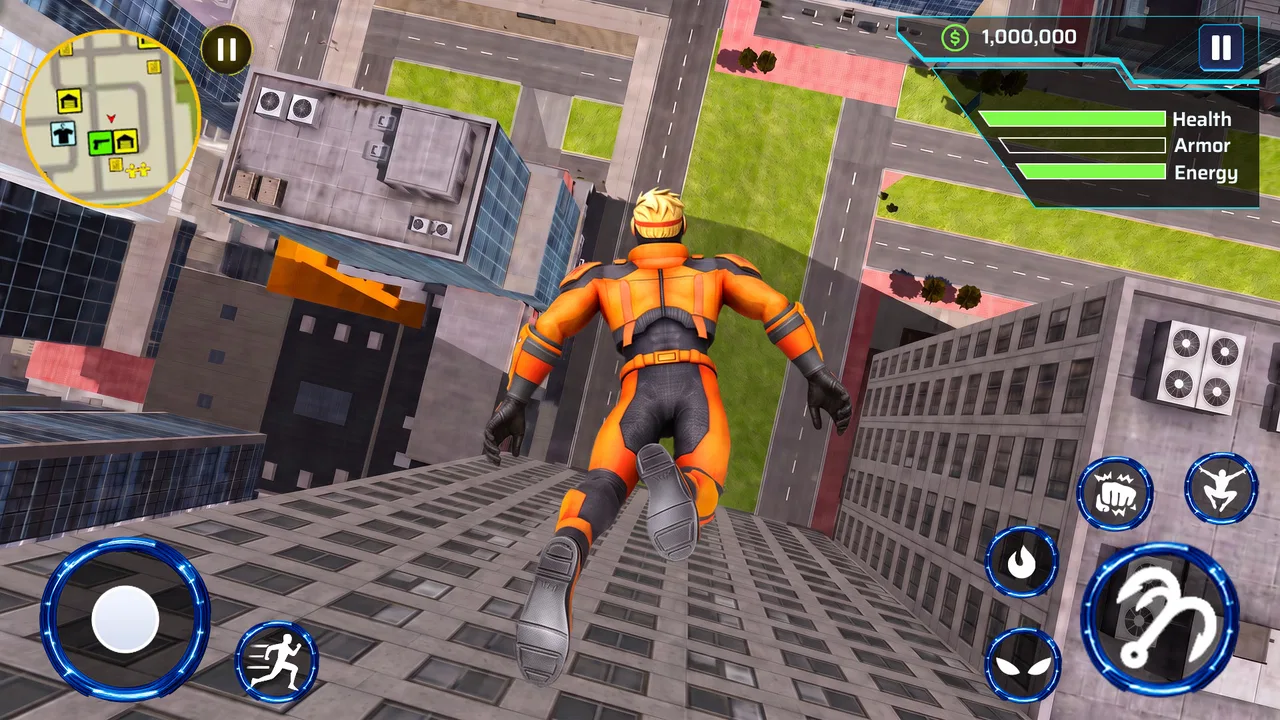
Hero Flying City Simulator is the kind of action game I open when I want a quick burst of movement rather than a long, complicated campaign. Its central idea is easy to understand: move through a city with ropes, gain height, travel between buildings, and work through missions. That simplicity makes it approachable, but it also means your enjoyment depends heavily on how comfortable you become with the movement. In my experience, the first few attempts can feel less like heroic flying and more like learning how to correct a swing without losing control.
The game is free, carries an Everyone age rating, and is made by BROWNE CURTIS HENRY. It has reached over one million installs and holds a 4.6 average from around 666 ratings, which suggests that the basic concept has found an audience. I would describe it as a lightweight city-swinging action game: immediately understandable, easy to try, and best suited to players who enjoy experimenting with movement instead of expecting a deep combat or simulation experience.
Getting past the first frustrating moments
The biggest early obstacle is not understanding the goal; it is learning the timing. Swinging with ropes looks simple on paper, yet small changes in direction can produce very different results. If I released too early, I lost forward momentum. If I held on too long, I arrived at the next building from an awkward angle. That learning curve is important because the game can seem unresponsive when the real issue is often a mistimed input.
You May Also Like

 Blood Strike: 2.5 Anniversary
Blood Strike’s Loadouts Turn Every Drop Into a Tactical Gamble
A close look at Blood Strike’s custom loadouts: how fast access to signature weapons reshapes its battle royale rhythm, rewards preparation, and narrows the gap between fights.

 Pandora - Music & Podcasts
Pandora’s Music Is Easy to Start, but Harder to Recover
Pandora’s strength is its low-effort path from a seed to a station. Its weak spot is how much confidence it asks you to place in connection, setup, and quiet recovery.

 8 Ball Pool
 Is Built on Rivalries, Rematches, and Routine
A close look at the rivalries, rematches, shared routines, and unanswered safety questions that turn a quick pool match into a persistent mobile community.

 Samsung Music
’s Quiet Strength Is Playing What You Already Own
Its reach comes less from spectacle than from dependable access to a personal library. That simplicity is both the app’s strongest retention engine and its ceiling.

 AccuWeather: Weather Radar
AccuWeather Review: A Quick, Clear Forecast for Everyday Decisions
For everyday plans, the best forecast is the one you can understand quickly. AccuWeather makes rain timing, radar, and local conditions easy to act on, with a few trade-offs.

 Hill Climb Racing
Why Hill Climb Racing Still Turns Crashes Into One More Run
A tiny car, a bumpy hill and one more upgrade: Hill Climb Racing keeps resurfacing because its simple chaos makes every near-miss feel personal.
More From Our News Desk
View All News


I found it more useful to treat each swing as a short movement problem rather than trying to cross the whole city in one dramatic leap. Start by watching the character’s arc, then decide whether the next action should add distance, gain height, or correct the landing. This approach makes the missions easier to read and reduces the feeling that every mistake is random.
Another common sticking point is trying to move too quickly before understanding the route. The city encourages forward motion, but rushing can leave you with no good attachment point or a poor approach to the next objective. I recommend taking the first attempts as practice runs. Look for repeatable landmarks, note where a jump usually fails, and use the next attempt to change only one part of the movement. That turns frustration into a useful routine.
The most important adjustment is to prioritize control over speed. A slower, deliberate swing is usually more valuable than a fast launch that ends with a missed landing. This is especially true when a mission requires several movements in sequence. You do not need to make every jump spectacular; you need to arrive in a position that gives you another safe option.
What the game feels like in ordinary use
A realistic session for me would be a short break between other tasks. I can start a mission, make a few attempts, and stop without needing to remember a complicated story or manage a large collection of equipment. That makes the game a good fit for casual play on a phone, especially when I want direct action and do not want to spend several minutes preparing a loadout or reading instructions.
At the same time, the simple structure may disappoint players who want a large open-world experience with extensive character development. The appeal here comes from the physical act of swinging through the environment and completing objectives. If you expect a full superhero adventure with elaborate dialogue, detailed progression, or a broad set of activities, this is probably not the right choice.
The short description, “Hero Flying City,” gives a fair impression of the mood, but it does not explain the practical challenge. The game is less about pressing a button to fly anywhere and more about managing momentum through connected movements. That distinction matters when deciding whether it matches your taste. Players who enjoy trial and error may find the movement satisfying; players who want immediate, perfectly predictable travel may find it irritating.
Checks I would make before blaming the game
Before playing seriously, I would make sure the device is running Android 7.0 or newer. That is the stated minimum operating system, so an older phone is not a sensible place to troubleshoot performance or compatibility. On a supported device, I would also close demanding apps in the background and restart the game if the controls begin to feel inconsistent after a long session.
It is also worth checking the basics of touch input. A dirty screen, a thick screen protector, damp fingers, or an accidental palm touch can make a timing-based game feel much worse. Because swinging depends on short, well-timed actions, even occasional missed touches are noticeable. I would clean the display, hold the phone comfortably, and avoid playing while the device is being handled awkwardly.
If the game starts normally but a mission behaves strangely, I would first leave that mission and try another attempt rather than repeatedly tapping the same control. A temporary input mistake can look like a broken objective when the character has simply entered an unfavorable position. Restarting the current attempt, when that option is available in the interface, is a sensible recovery step; I would not assume that reinstalling is necessary after one failed swing.
The game is free, which lowers the barrier to testing it for yourself. It also means I would judge it by whether the basic movement is enjoyable within the first few sessions, not by expecting the scale of a premium console-style title. If the controls still feel uncomfortable after giving them a fair practice period, that is useful information rather than a problem to force away.
One practical tip is to play in a stable orientation and avoid switching how you hold the phone halfway through a mission. Consistent hand placement makes it easier to repeat a successful gesture. I also prefer using shorter sessions at first. When I play for too long while frustrated, I start making hurried inputs and learn bad habits. A short pause can be more effective than another dozen failed attempts.
Recovering when a run goes wrong
When a swing fails, my first question is whether the mistake happened at the launch, during the arc, or at the landing. Those are different problems. A weak launch usually means I did not build enough movement before releasing. A bad arc often means I changed direction too late. A missed landing may mean I approached the target from the wrong side, even if the initial swing was good.
This simple diagnosis gives the game more depth than its store summary suggests. Instead of repeating the same action, I can change the timing at a specific point. For example, if I consistently pass below a rooftop, I would focus on gaining height earlier rather than releasing later. If I reach the destination but overshoot it, I would reduce the final push and aim for a safer approach.
When the character ends up in an awkward place, avoid frantic tapping. I have found that rapid, unplanned inputs make recovery harder because they remove any chance to read the next movement. Pause mentally, identify the nearest useful surface or route, and make one controlled correction. Even when the run cannot be saved, this method helps reveal what the mission expects.
It is helpful to separate mission failure from general control difficulty. If one objective repeatedly causes trouble while other routes feel manageable, the issue may be a demanding sequence rather than a complete control problem. I would replay easier sections to confirm that the basic movement is working, then return to the difficult mission with a specific plan. This is more efficient than changing every setting or assuming the whole game is malfunctioning.
Another useful workflow is to use the first attempt as reconnaissance. Do not treat it as wasted time. Watch how much space you have, where the next destination sits, and whether the route favors height or distance. On the second attempt, commit to one adjustment. This is particularly useful for players who normally dislike trial-and-error games because it gives each failure a clear purpose.
When the phone or connection is the real source of trouble
Not every problem that appears while playing is caused by Hero Flying City Simulator. A phone that is nearly full, heavily loaded with background processes, or running hot can make any action game feel less responsive. If movement becomes inconsistent only after the device has been used for a long time, I would close other apps, let the phone cool, and try again before drawing conclusions about the game itself.
Likewise, if the application fails to start or behaves differently after an interrupted download, I would check the basic installation path and make sure the operating system meets the minimum requirement. A restart is a reasonable first step. If the issue affects only one session, it may be temporary. If it happens repeatedly, I would record exactly when it occurs instead of describing the problem only as “the game is broken.” Details such as whether it happens at launch, during a mission, or after returning to the game make troubleshooting much more useful.
I would also avoid installing the game from unfamiliar sources. The official app route is the safer choice for a free title, particularly when the developer is listed as BROWNE CURTIS HENRY. Keeping the installation straightforward reduces the chance of confusing a damaged or modified package with a gameplay issue.
Connection problems can also be misleading. If a screen takes longer than usual to load, I would test the network with another app and retry once the connection is stable. I would not repeatedly clear data or reinstall after a single delay, because those steps can create more hassle than they solve. A measured sequence—check the connection, restart the app, then reassess—protects your progress and your time.
The version shown for the game is 1.0.7, so I would check whether the installed copy is current before spending a long time investigating an unusual issue. Updates can change how a game behaves, and troubleshooting an old installation may lead to the wrong conclusion. I would still keep expectations realistic: an update can address technical problems, but it cannot necessarily change a movement style that simply does not suit you.
Who will enjoy it, and who should choose something else
I think the game works best for players who enjoy movement challenges, short action sessions, and the satisfaction of improving through repetition. It is particularly suitable for someone who likes the idea of crossing a city by rope but does not want a complicated control scheme or a long setup process. The Everyone rating also makes it easier to consider for a broad household audience, although younger players may still need help with the timing and patience the movement requires.
It is less suitable for anyone looking for a realistic superhero simulator. The city is a playground for action rather than a promise of detailed real-world physics. I would also steer players toward a different type of game if their priority is competitive multiplayer, extensive customization, or a story-driven campaign. A standard platformer may be a better choice for precise jumps, while a larger open-world superhero game may better satisfy someone who wants exploration beyond mission-based swinging.
Compared with endless-runner games, this title asks for more deliberate control and less automatic forward movement. Compared with traditional platformers, it replaces fixed jumps with momentum and rope timing, making each route feel more improvisational. That trade-off is the main reason to choose it. You gain a distinctive way to travel through the city, but you give up some of the immediate predictability found in games built around simple left-and-right movement.
For a friend deciding whether to try it, I would say this: download it if the swinging itself sounds fun, not merely because the hero theme sounds appealing. Give the controls a fair chance, use early attempts to learn routes, and judge the game after you have stopped fighting the timing. If the movement still feels like work rather than play, another action game will probably be a better use of your time.
My practical verdict after using it
Hero Flying City Simulator succeeds because it has a clear hook that can be understood immediately: use ropes to move through an urban setting and complete missions. I like that it can fit into a short break and that improvement comes from learning timing rather than memorizing a large system. The free price makes trying it easy, and the strong average rating from its current audience supports the idea that the central movement has real appeal.
Its limitations are just as clear. The same rope-based control that makes it different can make the opening feel awkward. Players who want instant precision may lose patience, and those expecting a rich superhero world may find the experience narrower than the theme suggests. Technical trouble should be approached methodically, but not every uncomfortable moment is a technical fault; sometimes the game is asking for a style of play that does not match your preferences.
My recommendation is cautious but positive. I would keep it installed for quick action sessions and use the first missions to practice controlled swings rather than chasing speed. The best results come from treating each failed attempt as information, keeping the phone in a consistent position, and checking device basics before blaming the application. For casual players who enjoy city traversal and hands-on movement, this is a straightforward free action game with a worthwhile learning curve. For players seeking depth, realism, or a large superhero adventure, I would look elsewhere.
FAQs for Hero Flying City Simulator
01What is Hero Flying City Simulator all about?
Hero Flying City Simulator is an action-packed game that lets players take on the role of a superhero with the ability to fly. The game offers an open-world environment where you can explore the city, complete missions, and fight against crime. With stunning graphics and engaging gameplay, it provides an immersive experience for fans of superhero simulations.
02What are the system requirements for Hero Flying City Simulator?
To enjoy Hero Flying City Simulator, your device should meet certain requirements. For Android users, a device running Android 5.0 or higher is recommended. iOS users should have at least iOS 11.0. The game also requires a minimum of 2GB of RAM for optimal performance. Make sure you have enough storage space as well.
03Is Hero Flying City Simulator a free-to-play game?
Yes, Hero Flying City Simulator is free-to-play. However, it offers in-app purchases that can enhance your gameplay experience. These may include special abilities, costumes, and other upgrades. While the game can be enjoyed without spending money, these purchases can provide a quicker path to unlocking content.
04How does the control system work in Hero Flying City Simulator?
The game features intuitive touch controls optimized for mobile devices. Players can use on-screen buttons to control flight, combat, and navigation. The controls are designed to be user-friendly, allowing you to easily execute superhero moves and maneuvers. Tutorials are available at the start to help you get familiar with the controls.
05Is there a multiplayer mode in Hero Flying City Simulator?
Currently, Hero Flying City Simulator does not offer a multiplayer mode. The game is primarily a single-player experience, focusing on the narrative and missions. However, developers are considering future updates that may include multiplayer features, allowing players to team up or compete in the virtual city.
Pros
- Immersive 3D graphics enhance gameplay.
- Wide variety of superhero abilities.
- Open-world exploration is engaging.
- Smooth controls for flying and combat.
- Regular updates with new missions.
Cons
- Occasional in-game ads can be intrusive.
- Requires high-performance device.
- Limited customization options.
- Some missions feel repetitive.
- In-app purchases can be pricey.

Hero Flying City Simulator
Gallery